Because creating ads for multiple platforms shouldn't feel like a design admin task.
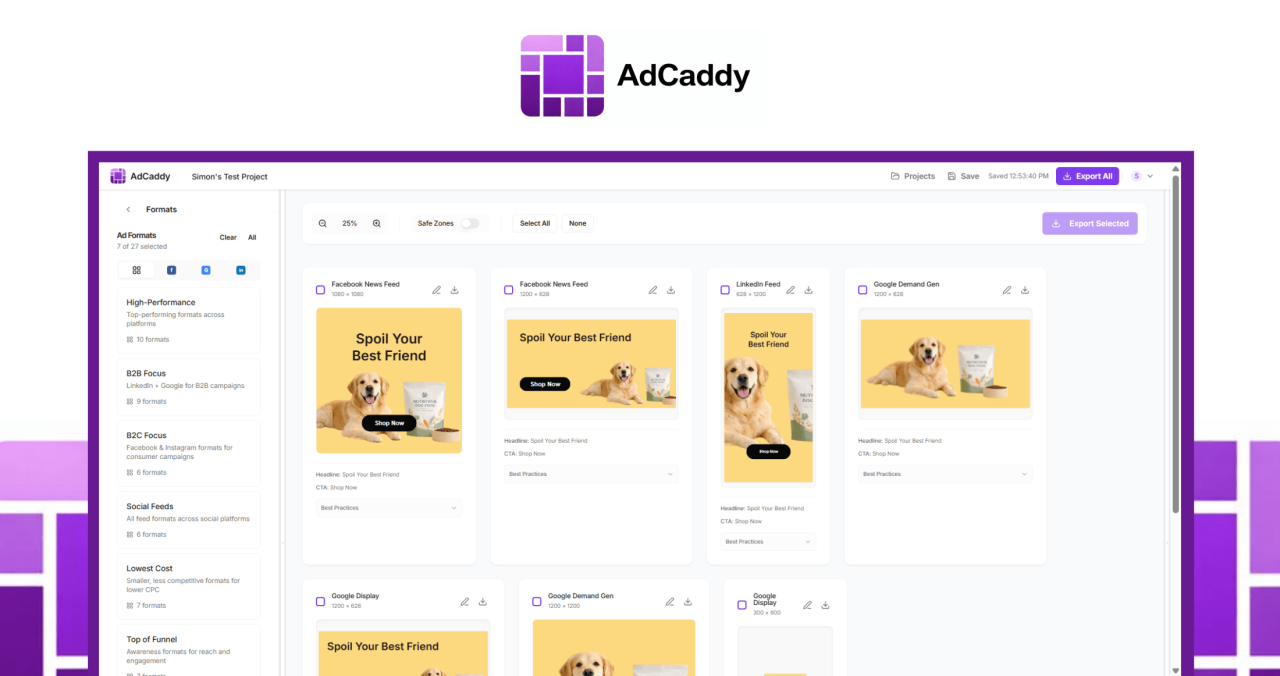
Most ad creation tools either try to do too much, cost too much, or bury simple workflows under layers of complexity. AdCaddy is designed to solve a high-value problem really well: transforming a campaign concept into every format you need, quickly, accurately, and with little effort.
Here's why teams choose AdCaddy:
This saves real campaign time Removing the manual work of creating 20 to 30 placement variants
It is easy to use So the promise of time savings is actually in practice
It applies best practices by default in layout, safe area, size and platform requirements
It supports fast testing So marketers can launch more variants and improve performance through iteration
It keeps teams consistent With template, folder, and role-based permissions
It speeds up creative output With AI generation and URL-based asset scraping
it stays focused The workflow that marketers really need, without being bloated or overcomplicated.
AdCaddy is for teams that want speed, stability, and simplicity without compromising creative quality.
how it works
1. To describe or generate Start with a creative brief, your own content, or a branded URL. AdCaddy can extract branding, sector information, images and context from a website, or use AI to generate headlines, body copy, CTAs and hero images for faster first drafts.
2. Adapt and Refine Adjust colors, fonts, images, layout, and individual format settings. Apply edits to each selected format simultaneously, or fine-tune specific placement where necessary. Safe zones and sector-specific best practice guidance help keep everything campaign-ready.
3. Export and deployment Choose your placements and export all creative in one click. AdCaddy gives you platform-ready files in the exact dimensions you need, so you can upload them directly to Google, Facebook, LinkedIn, and more.
Key features that turn ad production into a one-click workflow
One input, every size Add your content once and instantly create creative for multiple placements and platforms.
AI-powered ad creation Create headlines, body copy, CTAs and hero images from a simple overview when you need a first draft quickly.
URL scraping for instant reference Paste in a brand or client URL to automatically pull branding, sector information, images and other assets.
global content update Edit once and apply changes to all selected formats without repeating the same task again and again.
format-specific controls Reposition, resize, and toggle elements for different placement when additional refinements are needed.
safe areas were created Visual overlays help keep the main content visible across all devices and placements.
Region-aware best practices Layout guidance optimizes based on vertical, helping teams create more relevant, higher-converting creative.
Bulk export in exact dimensions Export every required format at once, or choose only the placements you need.
Brand palette and font controls Apply brand colors in one click and customize typography with 100+ Google Fonts.
One-click background removal Quickly clean up images without adding more tools to your workflow.
Templates and Folders Save reusable setups by client, brand, campaign type, funnel stage or vertical for fast repeatability.
Role-based permissions Control who can edit templates, move elements, or export files, making it easy to maintain brand consistency across teams.
Who is AdCaddy best for?
performance marketer Run campaigns on Google, Facebook, LinkedIn and other channels
agencies Managing multiple clients, brands and campaign structures at once
In-house marketing teams It needs to launch fast without adding creative hurdles
development team Who rely on repeated ad testing to improve results
design-lighting teams Those who require professional output without complex design workflows
Teams managing brand sustainability Across multiple users, customers or business units
Marketers are producing variants in high quantities For different placements, audiences or funnel stages
AdCaddy is especially useful for those who are tired of creating the same ad over and over again to fit different formats.


Leave a Reply