Why Helpmate?
Because most WordPress businesses are running on fragmentation.
A plugin for chat. One for CRM. One for abandoned vehicles. One for the coupon. One for social automation. One for email campaigns. The result is usually the same: more equipment, more confusion, more costs, and more time wasted managing the system instead of growing the business.
HelpMate is different because it removes that operational confusion:
-
An intelligent system rather than a stacked toolset
-
One place for support, CRM, cart recovery, social automation, and sales tools
-
Less plugin clutter, lower costs and fewer moving parts
-
Better automation in customer conversations and follow-ups
-
A real operational layer for WordPress, not just another feature bundle
HelpMate was built to unify functionality that is typically scattered across multiple plugins. Instead of linking devices together and hoping they cooperate, you install an engine that helps your business run more smoothly from the first message to the last sale.
What do you get with Helpmate

HelpMate lets you manually link together most WordPress businesses' systems, but into one connected platform.
-
AI that understands your knowledge base and responds instantly
-
Automation that runs without manual reminders
-
A CRM that turns conversations into structured customer data
-
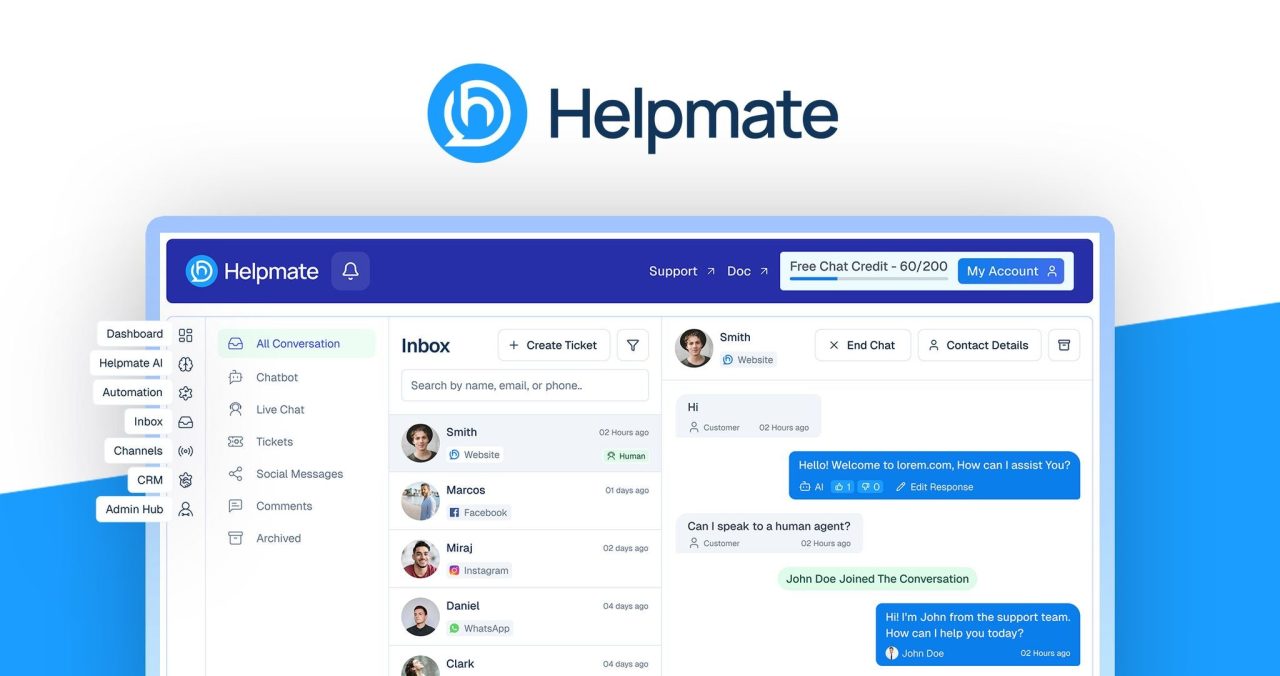
A unified inbox that helps you capture every opportunity
-
WordPress-ready tools for support, sales, and customer management
It's more than a collection of features. It's the infrastructure that helps your business respond faster, operate more smoothly, and grow with less friction.
how it works
HelpMate is designed to be easy to launch and powerful once it goes live.
-
Install Helpmate on WordPress
-
Train AI from your knowledge base
-
Connect your social channels
-
Set up your automation rules, tone, and workflow
-
Monitor performance and optimize with analytics
Once setup is complete, HelpMate automatically begins handling repetitive tasks, including:
Instead of manually managing each customer interaction, you get a system that responds, follows up, and supports sales around the clock.
Key Features That Convert Support to Sales
Helpmate+Chatbot

-
Knowledge-trained Al: Powered by your own knowledge base to automatically deliver accurate, brand-aligned answers
-
Complete Personality Control: Adapt tone, language and behavior to match your brand voice and customer expectations
-
Safe Test Mode: Preview and test chatbot responses before going live to ensure quality and accuracy
-
Quick Order Tracking: Customers can check the status of their orders directly inside chat using simple details, eliminating the recurring “where is my order?” can be terminated. Question
-
Refund and return requests in chat: Streamline refunds and returns management through structured chat workflows that save time and improve customer confidence
-
Image-Based Product Search: Let customers upload an image to quickly find matching products, speeding up search and increasing purchase intent

automation

-
Auto DM Answer: Reply to Facebook, Instagram and WhatsApp messages instantly without any human effort
-
Auto comment reply: Automatically engage with comments to foster conversation and capture potential leads
-
Abandoned Cart Recovery: Follow up on buyers who leave without purchasing and automatically recover lost revenue
-
Email Campaign: Send one-time or scheduled email broadcasts directly from your dashboard
-
Email Sequence: Create automated follow-up flows that nurture leads and drive repeat sales
-
Smart Coupon Delivery: Trigger personalized discount codes based on user ask or exit intent
-
Active Sales: Show discounted products at the top of the chat window
-
Promo Bar: Highlight offers, updates or urgent messages with eye-catching site banners
-
Live Sales Notifications: Display purchase alerts in real-time to increase trust and encourage conversions
-
Lead Capture: Collect names, emails, and phone numbers automatically from chats, DMs, and comments without any additional forms. Convert conversations to qualified leads and grow your database on autopilot.
unified inbox

-
All conversations: Centralize every customer interaction into one control center. No tab switching. No messages lost. no chaos
-
AL Chatbot Inbox: View and manage all automated chatbot conversations from one centralized dashboard
-
Live Chat Inbox: Handle real-time website chat without switching tools or losing context
-
Ticket Management: Turn complex conversations into organized support tickets for structured solutions
-
Social Messages: Centralize Facebook, Instagram and WhatsApp conversations into one unified workspace. No platform switching. no missed messages
-
Comment Management: Monitor and respond to Facebook and Instagram comments from one place
-
Conversation Archive: Access and review past conversations at any time for follow-up, audit or insight
CRM

-
Contact Management: Store and manage customer profiles with detailed history inside a centralized CRM
-
notes: Attach internal notes to contacts to keep complete context of conversations and actions
-
Leadership: Access full lead history from chat and social interactions organized and tracked inside your CRM
-
Smart Partition: Organize contacts into targeted segments using filters and behavior-based rules
-
Custom Fields: Create custom data fields to track information specific to your business workflow
-
Appointment and Booking: Manage customer appointments and service bookings directly within the CRM
-
task management: Assign and track tasks to ensure follow-ups and internal actions are never missed
-
Email Template: Create reusable email templates for consistent, professional communications
Admin Hub

-
Teams and Roles Management: Assign roles and control access permissions to manage who can view, edit, or respond inside the system
-
Performance Analysis: Track conversations, leads, automation activity and overall engagement with actionable insights
-
Flexible module control: Activate or deactivate modules based on your business needs to keep your system streamlined and optimized
use cases
-
business automation: Streamline repetitive workflows and reduce manual tasks in your operations
- Marketing Automation: Effortlessly automate campaigns, follow-ups, and promotions to stay top of people's minds
-
sales enablement: Engage potential customers instantly and guide them to make faster purchasing decisions
-
customer service: Provide 24/7 support in AL and organized ticket management. Commerce: Improve conversions with cart recovery, smart coupons, and order tracking
-
Social DM and Comment Lead Capture:Automatically convert social messages and comments into structured leads.
If your business depends on conversations, HelpMate turns those conversations into conversions.
Who is HelpMate best for?
HelpMate is built for WordPress businesses that want more automation, more operational clarity, and less tool fragmentation.
It is ideal for WooCommerce Store Owner Who want to stop stacking different plugins for chat, CRM, cart recovery, and email marketing, and move to one intelligent system that handles support and sales more efficiently.
This is also a strong option for Agencies that manage WordPress client sitesProvides them with a centralized way to handle communications, customer data, and automation without relying on multiple disconnected SaaS tools.
For service-based businessHelpmate helps streamline bookings, enquiries, lead capture and follow-up, making it easier to stay responsive without increasing manual workload.
is helpmate Not built for Shopify or non-WordPress platformsand this is Not designed for large enterprises That requires deeply customized AI infrastructure or complex API engineering.
This is focused automation for practical businesses that want leverage, not complexity.
Built for growth-minded operators.
Designed for real-world revenue impact.
Testimonial


Leave a Reply